01 / FIELDWORK & LOCATION Launching soon
GeoFlux
A fresh perspective
on fieldwork.
Inspections, location and operational information in one app. From field records to management insights, with maps, photos and reports.
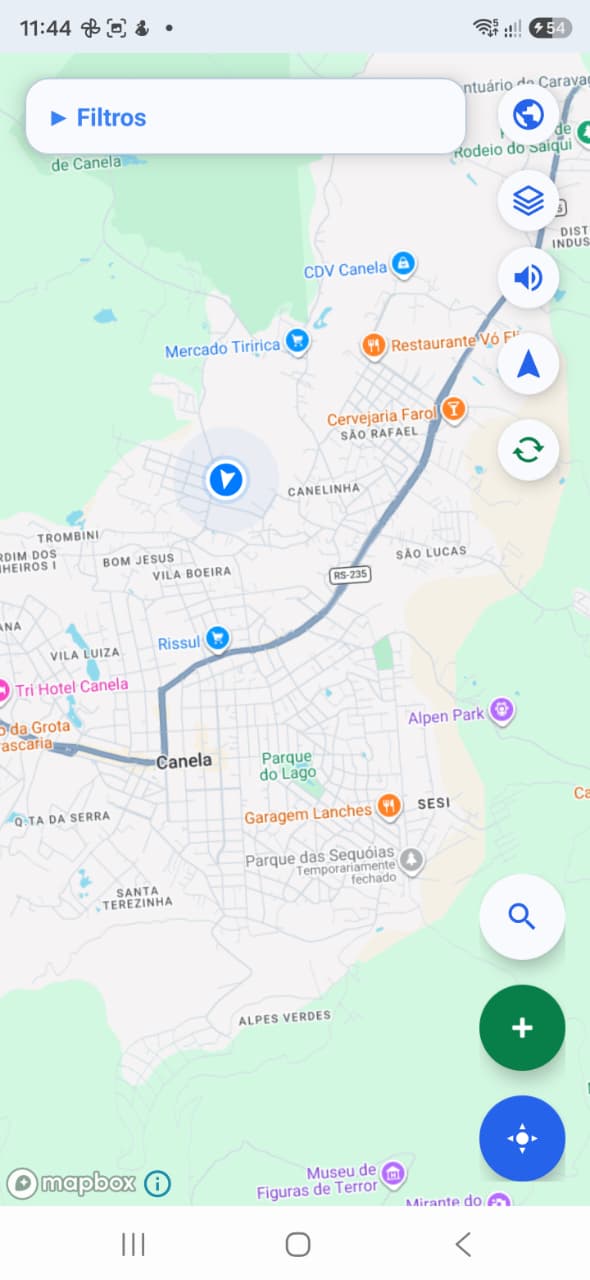
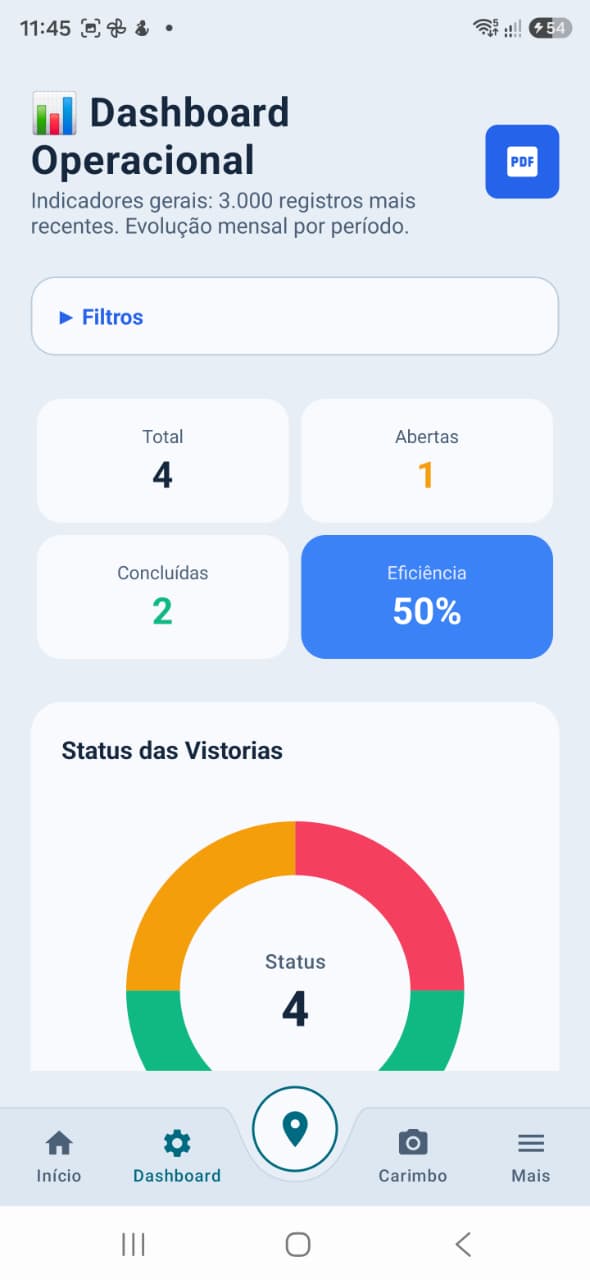 GeoFlux by João Pedro Perez
From fieldwork to the big picture. Inspections, maps and reports to get your operation moving.
EXPLORE GEOFLUX ↗Apps by João Pedro PerezA fresh perspective
on fieldwork.
Inspections, location and operational information in one app. From field records to management insights, with maps, photos and reports.
Inspections with photos and coordinates to give every record context.
Maps, routes and a dashboard to track work and outstanding tasks.
Excel exports and PDF reports to support operational analysis.
GeoFlux is in internal testing on the Play Store. Public availability will be announced after this stage.
Record, locate, track and share. Explore app screens and features identified in the project, from fieldwork to team management.
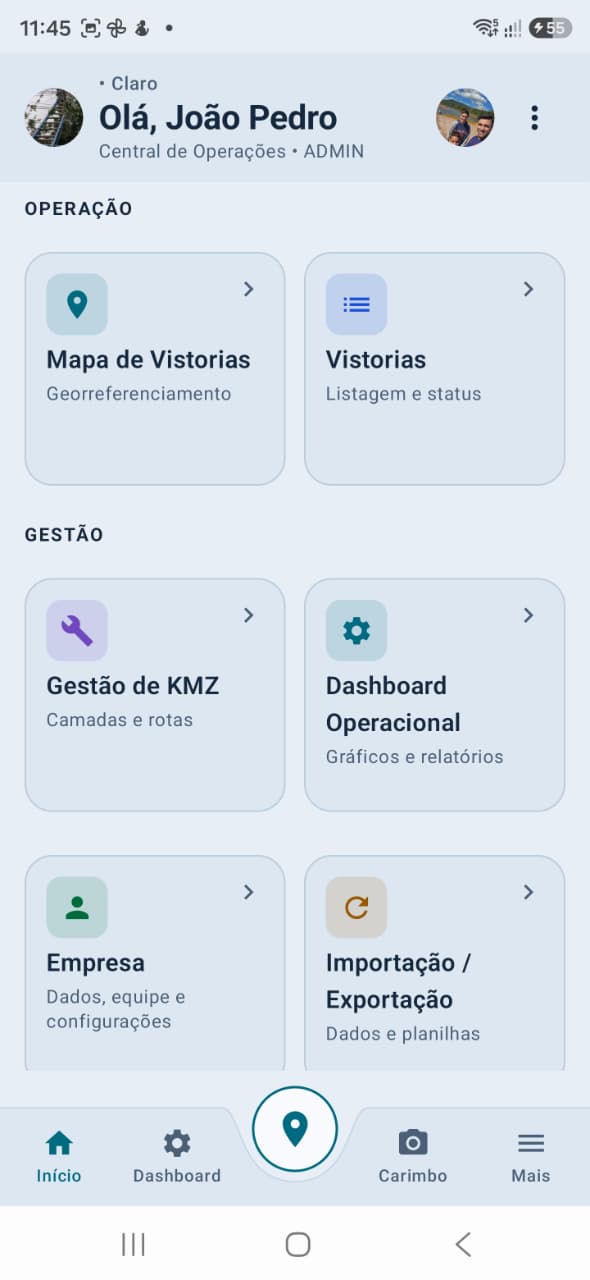
Inspections with location, priority, photos and execution details.
Maps, infrastructure layers and your routes to give work context.
A dashboard, PDF report and spreadsheets to monitor operations.
Screenshots provided by the creator. Data, indicators and limits shown reflect the captured version and may change in later releases; they are not promised results. Tap screens to enlarge.
Open each area to explore its features.
Access the map, inspections, KMZ management, dashboard, business settings and import/export modules. Navigation shortcuts for home, dashboard, map, photo stamps and additional functions.
Record identifiers, issues, addresses, cities, states, regions, priorities and coordinates. Track opening, execution, completion and reopening, according to user permissions.
Browse inspections with search and filters to find operational records. Organize by location, status, priority and other criteria available on screen, within the user’s authorized scope.
Track open, completed and justified pending inspections. Record notes, the person who justified a pending status and dates to give the history context.
Capture and attach photos when opening and performing an inspection, including additional images. Enlarged viewing, annotations and tracking of pending media uploads.
Camera capture with configurable date and time, address, coordinates, GPS accuracy, business, user and logo fields. The project also includes inspection data, cause, service, notes and tags, depending on the context and configured policy.
Georeferenced viewing, filters, search, location and orientation controls. View inspections on the map alongside authorized layers and displayed routes.
Import and organize KML/KMZ files in folders, and show or hide reference layers on the map. Folder access depends on member permissions; new uploads require a connection.
Record routes with distance and time, pause and resume, finish and name them. View, show, hide, center, rename and delete saved routes. Recording a route does not automatically complete inspections.
Local data and operations with later synchronization, subject to valid offline authorization, session and permissions. Routes may remain pending synchronization; new file uploads and complete server queries require an internet connection.
Totals, inspection statuses, efficiency, charts and trends over time. Filters to monitor operations and the distribution of outstanding work. The dashboard shows a record subset identified on screen.
Operational summary, trends, cities, causes, priorities, maps and data quality. Export uses a dedicated read of authorized records and identifies its scope; if already-loaded data is used, the report identifies it as a subset.
Import inspections from spreadsheets and export to Excel (.xlsx), with filters and an option to include or exclude photos. Record counts, photo counts and export usage follow configured limits and plan quotas.
Business catalogs of causes and services used in records and inspection execution. Manage active and inactive options while preserving data already recorded in inspection history.
Business setup and selection, member and profile management, with access scoped by cities, regions, priorities, statuses and KMZ folders. Settings and administrative changes depend on the member’s role.
Sign-up and login, profile, authorized device sessions, activity records, searchable help and legal information. Business plan viewing and management, plus account and business deletion flows where permitted by the user’s role.
GeoFlux is in internal testing on the Play Store. This description is based on the source code available in the project and the supplied screenshots. Feature availability depends on version, plan, connection, permissions and device authorization. Location accuracy depends on GPS.
More organization.
From shelf to sale.
Products, inventory, sales and an online storefront brought together in a day-to-day business management project. See actual screens and explore the modules already included in development.
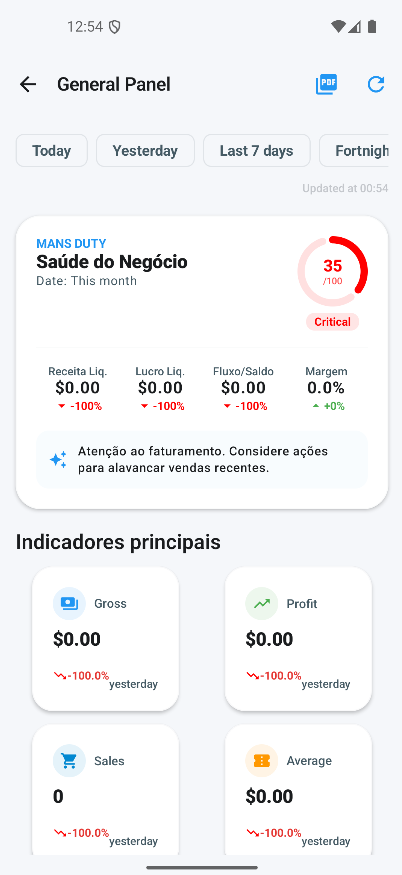
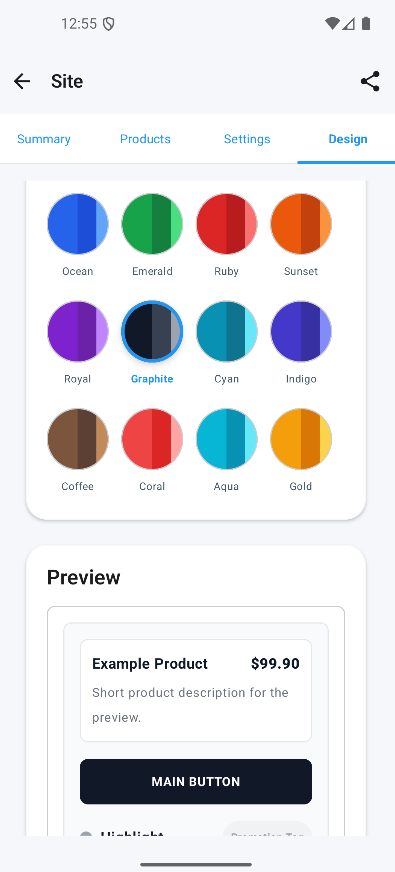
Product records and inventory control at the heart of the operation.
A POS workflow with a cart, customers, quotes and payment methods, currently in development.
Design and business rules are being refined before the app becomes available.
Almox Control is not yet available to download. Features may change during development.
A project that goes beyond inventory: bringing together sales operations, business records, a digital storefront and insights to monitor the business.
Open each area to explore its features.
Product records with photos, descriptions, internal codes, SKUs, barcodes, categories, subcategories, brands and units. Cost and selling prices, margins, markup, promotions, attributes and variations.
Stock levels and minimum quantities, replenishment alerts, incoming and outgoing stock, and adjustments. Inventory counts, storage locations by aisle, shelf and bin, plus batch identification.
Search and barcode scanning, shopping cart, customer selection, quantities, discounts, shipping and notes. Drafts, quotes, review, completion, sales history and sale details.
Record cash and change, Pix, credit and debit cards, store credit, transfers and other methods. Split payments and cash history. Recording a payment in the app does not imply integrated bank processing.
Find a sale, select returned items and quantities, and record the reason and refund amount. The project includes full and partial returns and sale status tracking.
Customer records and search, details, purchase history and starting a sale from a customer record. Track amounts, orders and outstanding balances according to the access role.
Supplier records, search and details, product associations and tracking of supplier-related transactions.
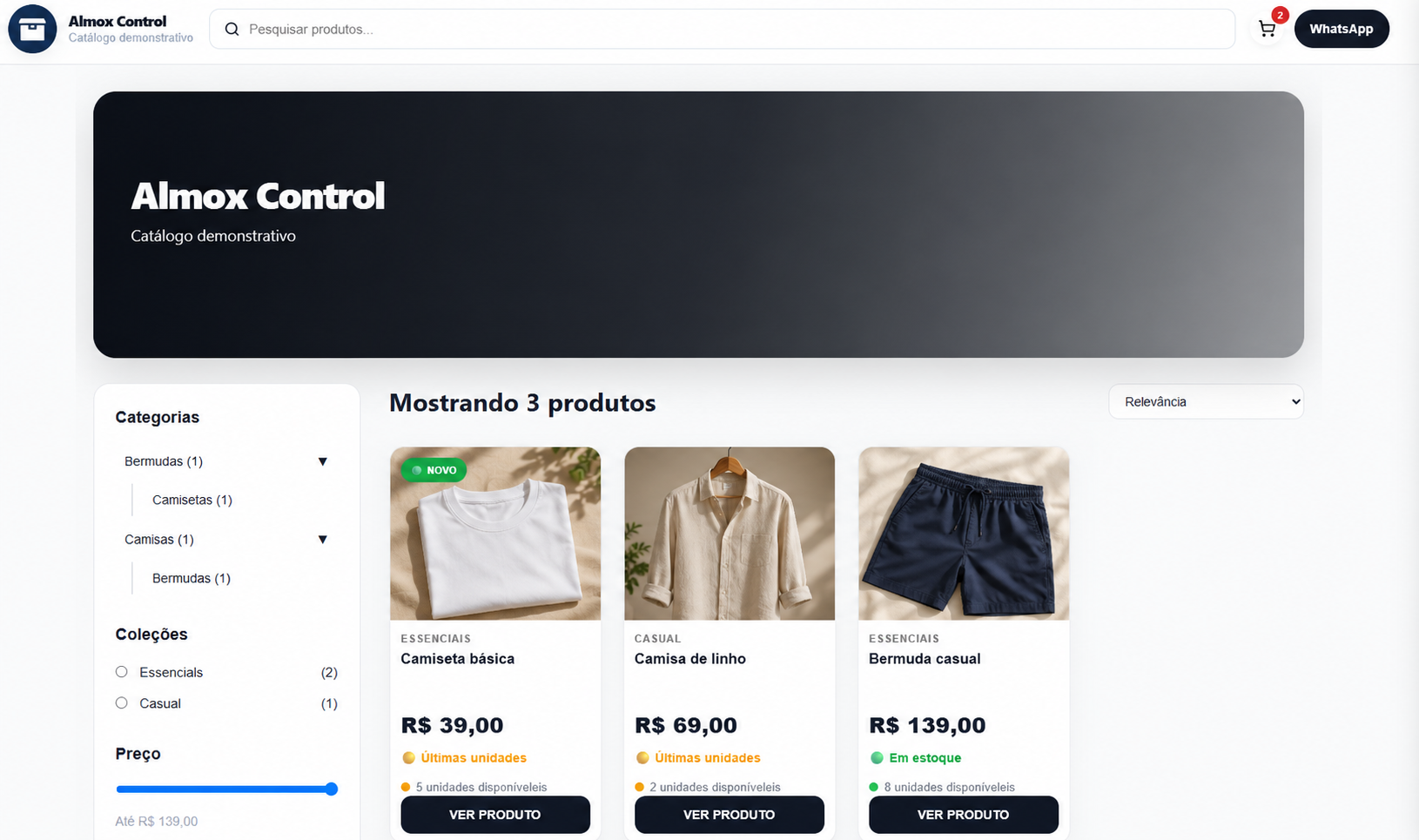
Publish or hide products, share a storefront address and monitor site visits, orders and customers. The storefront shown includes search, categories, brands, price filters, sorting, availability, a cart and WhatsApp contact.
Store name, description, storefront settings and color themes with a preview. Delivery, pickup, installment display and out-of-stock product options, depending on catalog settings.
Order list, pending-order filters, detail screens and tracking of orders coming from the online catalog.
Revenue, profit, sales, average order value, margin and cash-flow indicators. Period filters, comparisons, business health, customer and category rankings, and alerts, with dashboard export to PDF.
Select products and generate PDF labels, with a preview and options for name, price, logo, category, brand and barcode. Barcode scanning within product and sales workflows.
Weekly, monthly and six-month views, reminders with a date and time, priority and an optional notification.
Import products, customers and suppliers from Excel or CSV, with spreadsheet templates, validation and preview. Data exports and a history of import and export operations.
Business setup and selection, team management and invitations. Owner, administrator, manager and seller roles, with role-based permissions and restricted-access screens.
Global search, notifications, recent activity and help. Sign-up, login, profile, business settings and plan information, with feature limits depending on the plan and user role.
The project includes screens for insights, recommendations, a business radar, scenario simulation, chat and a timeline. The simulator contains illustrative calculations and responses; this module is still in development and is not presented as validated financial analysis.
Features identified in the supplied Almox Control screens and source code. The presence of a module in the project does not mean it is complete or publicly available. The app is still in development; availability, limits and access may vary by version, plan and role. Screenshots preserve the interface of the version shown and may contain text in both languages.

Creator of GeoFlux and Almox Control
I’m João Pedro Perez. I develop apps focused on practical, everyday needs.
I’m building GeoFlux, now preparing for launch, to support fieldwork with inspections, maps and operational information. I’m also developing Almox Control to help organize products, inventory and sales. My goal is to create useful tools with a clear experience that keeps improving.
Internal testing and launch preparation.
Launching soonDevelopment and experience refinement.
In developmentQuestions about the app and its launch.